


Information
# OpenClaw — Personal AI Assistant
\`), npm dist-tag \`latest\`.
- **beta**: prerelease tags (\`vYYYY.M.D-beta.N\`), npm dist-tag \`beta\` (macOS app may be missing).
- **dev**: moving head of \`main\`, npm dist-tag \`dev\` (when published).
Switch channels (git + npm): \`openclaw update --channel stable|beta|dev\`.
Details: [Development channels](https://docs.openclaw.ai/install/development-channels).
## From source (development)
Prefer \`pnpm\` for builds from source. Bun is optional for running TypeScript directly.
\`\`\`bash
git clone https://github.com/openclaw/openclaw.git
cd openclaw
pnpm install
pnpm ui:build # auto-installs UI deps on first run
pnpm build
pnpm openclaw onboard --install-daemon
# Dev loop (auto-reload on TS changes)
pnpm gateway:watch
\`\`\`
Note: \`pnpm openclaw ...\` runs TypeScript directly (via \`tsx\`). \`pnpm build\` produces \`dist/\` for running via Node / the packaged \`openclaw\` binary.
## Security defaults (DM access)
OpenClaw connects to real messaging surfaces. Treat inbound DMs as **untrusted input**.
Full security guide: [Security](https://docs.openclaw.ai/gateway/security)
Default behavior on Telegram/WhatsApp/Signal/iMessage/Microsoft Teams/Discord/Google Chat/Slack:
- **DM pairing** (\`dmPolicy="pairing"\` / \`channels.discord.dm.policy="pairing"\` / \`channels.slack.dm.policy="pairing"\`): unknown senders receive a short pairing code and the bot does not process their message.
- Approve with: \`openclaw pairing approve

EXFOLIATE! EXFOLIATE!




\` (then the sender is added to a local allowlist store).
- Public inbound DMs require an explicit opt-in: set \`dmPolicy="open"\` and include \`"*"\` in the channel allowlist (\`allowFrom\` / \`channels.discord.dm.allowFrom\` / \`channels.slack.dm.allowFrom\`).
Run \`openclaw doctor\` to surface risky/misconfigured DM policies.
## Highlights
- **[Local-first Gateway](https://docs.openclaw.ai/gateway)** — single control plane for sessions, channels, tools, and events.
- **[Multi-channel inbox](https://docs.openclaw.ai/channels)** — WhatsApp, Telegram, Slack, Discord, Google Chat, Signal, iMessage, BlueBubbles, Microsoft Teams, Matrix, Zalo, Zalo Personal, WebChat, macOS, iOS/Android.
- **[Multi-agent routing](https://docs.openclaw.ai/gateway/configuration)** — route inbound channels/accounts/peers to isolated agents (workspaces + per-agent sessions).
- **[Voice Wake](https://docs.openclaw.ai/nodes/voicewake) + [Talk Mode](https://docs.openclaw.ai/nodes/talk)** — always-on speech for macOS/iOS/Android with ElevenLabs.
- **[Live Canvas](https://docs.openclaw.ai/platforms/mac/canvas)** — agent-driven visual workspace with [A2UI](https://docs.openclaw.ai/platforms/mac/canvas#canvas-a2ui).
- **[First-class tools](https://docs.openclaw.ai/tools)** — browser, canvas, nodes, cron, sessions, and Discord/Slack actions.
- **[Companion apps](https://docs.openclaw.ai/platforms/macos)** — macOS menu bar app + iOS/Android [nodes](https://docs.openclaw.ai/nodes).
- **[Onboarding](https://docs.openclaw.ai/start/wizard) + [skills](https://docs.openclaw.ai/tools/skills)** — wizard-driven setup with bundled/managed/workspace skills.
## Star History
[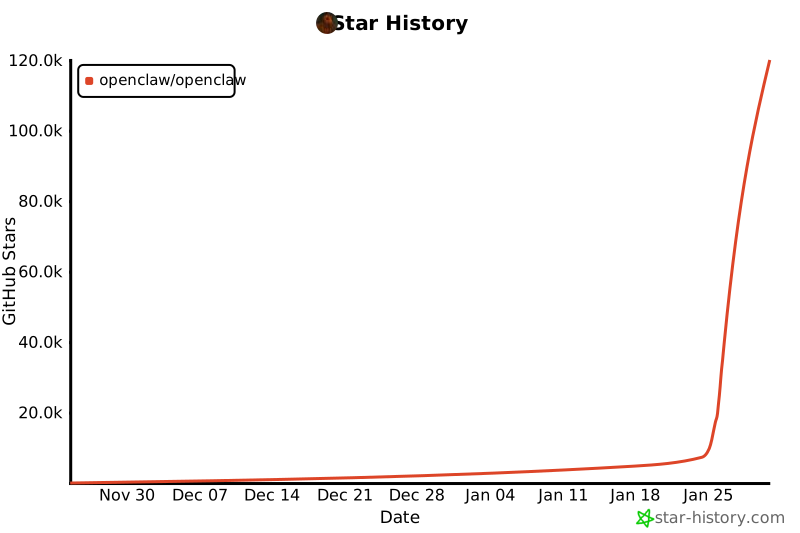](https://www.star-history.com/#openclaw/openclaw&type=date&legend=top-left)
## Everything we built so far
### Core platform
- [Gateway WS control plane](https://docs.openclaw.ai/gateway) with sessions, presence, config, cron, webhooks, [Control UI](https://docs.openclaw.ai/web), and [Canvas host](https://docs.openclaw.ai/platforms/mac/canvas#canvas-a2ui).
- [CLI surface](https://docs.openclaw.ai/tools/agent-send): gateway, agent, send, [wizard](https://docs.openclaw.ai/start/wizard), and [doctor](https://docs.openclaw.ai/gateway/doctor).
- [Pi agent runtime](https://docs.openclaw.ai/concepts/agent) in RPC mode with tool streaming and block streaming.
- [Session model](https://docs.openclaw.ai/concepts/session): \`main\` for direct chats, group isolation, activation modes, queue modes, reply-back. Group rules: [Groups](https://docs.openclaw.ai/concepts/groups).
- [Media pipeline](https://docs.openclaw.ai/nodes/images): images/audio/video, transcription hooks, size caps, temp file lifecycle. Audio details: [Audio](https://docs.openclaw.ai/nodes/audio).
### Channels
- [Channels](https://docs.openclaw.ai/channels): [WhatsApp](https://docs.openclaw.ai/channels/whatsapp) (Baileys), [Telegram](https://docs.openclaw.ai/channels/telegram) (grammY), [Slack](https://docs.openclaw.ai/channels/slack) (Bolt), [Discord](https://docs.openclaw.ai/channels/discord) (discord.js), [Google Chat](https://docs.openclaw.ai/channels/googlechat) (Chat API), [Signal](https://docs.openclaw.ai/channels/signal) (signal-cli), [iMessage](https://docs.openclaw.ai/channels/imessage) (imsg), [BlueBubbles](https://docs.openclaw.ai/channels/bluebubbles) (extension), [Microsoft Teams](https://docs.openclaw.ai/channels/msteams) (extension), [Matrix](https://docs.openclaw.ai/channels/matrix) (extension), [Zalo](https://docs.openclaw.ai/channels/zalo) (extension), [Zalo Personal](https://docs.openclaw.ai/channels/zalouser) (extension), [WebChat](https://docs.openclaw.ai/web/webchat).
- [Group routing](https://docs.openclaw.ai/concepts/group-messages): mention gating, reply tags, per-channel chunking and routing. Channel rules: [Channels](https://docs.openclaw.ai/channels).
### Apps + nodes
- [macOS app](https://docs.openclaw.ai/platforms/macos): menu bar control plane, [Voice Wake](https://docs.openclaw.ai/nodes/voicewake)/PTT, [Talk Mode](https://docs.openclaw.ai/nodes/talk) overlay, [WebChat](https://docs.openclaw.ai/web/webchat), debug tools, [remote gateway](https://docs.openclaw.ai/gateway/remote) control.
- [iOS node](https://docs.openclaw.ai/platforms/ios): [Canvas](https://docs.openclaw.ai/platforms/mac/canvas), [Voice Wake](https://docs.openclaw.ai/nodes/voicewake), [Talk Mode](https://docs.openclaw.ai/nodes/talk), camera, screen recording, Bonjour pairing.
- [Android node](https://docs.openclaw.ai/platforms/android): [Canvas](https://docs.openclaw.ai/platforms/mac/canvas), [Talk Mode](https://docs.openclaw.ai/nodes/talk), camera, screen recording, optional SMS.
- [macOS node mode](https://docs.openclaw.ai/nodes): system.run/notify + canvas/camera exposure.
### Tools + automation
- [Browser control](https://docs.openclaw.ai/tools/browser): dedicated openclaw Chrome/Chromium, snapshots, actions, uploads, profiles.
- [Canvas](https://docs.openclaw.ai/platforms/mac/canvas): [A2UI](https://docs.openclaw.ai/platforms/mac/canvas#canvas-a2ui) push/reset, eval, snapshot.
- [Nodes](https://docs.openclaw.ai/nodes): camera snap/clip, screen record, [location.get](https://docs.openclaw.ai/nodes/location-command), notifications.
- [Cron + wakeups](https://docs.openclaw.ai/automation/cron-jobs); [webhooks](https://docs.openclaw.ai/automation/webhook); [Gmail Pub/Sub](https://docs.openclaw.ai/automation/gmail-pubsub).
- [Skills platform](https://docs.openclaw.ai/tools/skills): bundled, managed, and workspace skills with install gating + UI.
### Runtime + safety
- [Channel routing](https://docs.openclaw.ai/concepts/channel-routing), [retry policy](https://docs.openclaw.ai/concepts/retry), and [streaming/chunking](https://docs.openclaw.ai/concepts/streaming).
- [Presence](https://docs.openclaw.ai/concepts/presence), [typing indicators](https://docs.openclaw.ai/concepts/typing-indicators), and [usage tracking](https://docs.openclaw.ai/concepts/usage-tracking).
- [Models](https://docs.openclaw.ai/concepts/models), [model failover](https://docs.openclaw.ai/concepts/model-failover), and [session pruning](https://docs.openclaw.ai/concepts/session-pruning).
- [Security](https://docs.openclaw.ai/gateway/security) and [troubleshooting](https://docs.openclaw.ai/channels/troubleshooting).
### Ops + packaging
- [Control UI](https://docs.openclaw.ai/web) + [WebChat](https://docs.openclaw.ai/web/webchat) served directly from the Gateway.
- [Tailscale Serve/Funnel](https://docs.openclaw.ai/gateway/tailscale) or [SSH tunnels](https://docs.openclaw.ai/gateway/remote) with token/password auth.
- [Nix mode](https://docs.openclaw.ai/install/nix) for declarative config; [Docker](https://docs.openclaw.ai/install/docker)-based installs.
- [Doctor](https://docs.openclaw.ai/gateway/doctor) migrations, [logging](https://docs.openclaw.ai/logging).
## How it works (short)
\`\`\`
WhatsApp / Telegram / Slack / Discord / Google Chat / Signal / iMessage / BlueBubbles / Microsoft Teams / Matrix / Zalo / Zalo Personal / WebChat
│
▼
┌───────────────────────────────┐
│ Gateway │
│ (control plane) │
│ ws://127.0.0.1:18789 │
└──────────────┬────────────────┘
│
├─ Pi agent (RPC)
├─ CLI (openclaw …)
├─ WebChat UI
├─ macOS app
└─ iOS / Android nodes
\`\`\`
## Key subsystems
- **[Gateway WebSocket network](https://docs.openclaw.ai/concepts/architecture)** — single WS control plane for clients, tools, and events (plus ops: [Gateway runbook](https://docs.openclaw.ai/gateway)).
- **[Tailscale exposure](https://docs.openclaw.ai/gateway/tailscale)** — Serve/Funnel for the Gateway dashboard + WS (remote access: [Remote](https://docs.openclaw.ai/gateway/remote)).
- **[Browser control](https://docs.openclaw.ai/tools/browser)** — openclaw‑managed Chrome/Chromium with CDP control.
- **[Canvas + A2UI](https://docs.openclaw.ai/platforms/mac/canvas)** — agent‑driven visual workspace (A2UI host: [Canvas/A2UI](https://docs.openclaw.ai/platforms/mac/canvas#canvas-a2ui)).
- **[Voice Wake](https://docs.openclaw.ai/nodes/voicewake) + [Talk Mode](https://docs.openclaw.ai/nodes/talk)** — always‑on speech and continuous conversation.
- **[Nodes](https://docs.openclaw.ai/nodes)** — Canvas, camera snap/clip, screen record, \`location.get\`, notifications, plus macOS‑only \`system.run\`/\`system.notify\`.