# ️ Yantr
**Turn any server, PC, laptop, or Mac into your own self-hosted homelab**
[](https://github.com/besoeasy/yantr/pkgs/container/yantr)
[](https://vuejs.org)
[](LICENSE)
Run 100+ powerful applications on-demand, without buying extra hardware or replacing your OS. Yantr turns the machine you already have into a self-hosted homelab, while keeping every app isolated: it never touches your host filesystem and stores data only in Docker volumes. **First platform to ship a complete AI agent suite** with Ollama, Open WebUI, Perplexica, OpenCode, and more—each in its own isolated environment. If you like Umbrel but do not want an OS takeover, Yantr gives you the same app-store flow on the machine you already use.
[ Quick Start](#-quick-start) • [ Features](#-features) • [ AI Agents](#-complete-ai-agent-ecosystem) • [️ Apps](#%EF%B8%8F-app-catalog) • [ Demo Video](https://media.primal.net/uploads2/4/88/71/4887131c91f8868696e1b899085481bd22b016f6a7f936fb3f76e746d63fc119.mp4) • [ Issues](https://github.com/besoeasy/yantr/issues)
---
## Quick Start
Launch Yantr in seconds with a single Docker command and access it at http://localhost.
\`\`\`bash
docker run -d \
--name yantr \
-p 80:5252 -p 443:5252 \
-v /var/run/docker.sock:/var/run/docker.sock \
--restart unless-stopped \
ghcr.io/besoeasy/yantr
\`\`\`
** That’s it!** Open your browser and navigate to http://localhost to start deploying apps.
### System Requirements
- **Docker** installed and running
- **Linux, macOS, or Windows** (with Docker Desktop)
- **Disk space** for app data (minimal baseline, grows with apps)
- **Network access** to Docker daemon
---
## At a Glance
| | |
| ------------------ | ----------------------------------------------- |
| **Philosophy** | App Store (not an OS replacement) |
| **Hardware** | Use your existing server/PC/Laptop/Mac |
| **Installation** | Single Docker command |
| **Commitment** | Zero—install, use, delete |
| **Ecosystem** | 100% Docker Compose (no lock-in) |
| **Resource Usage** | On-demand (nothing runs unless you start it) |
---
## Features
|
### One-Click Deploys
Instant access to popular self-hosted apps with clean defaults and smart presets.
|
### ⏱️ Temporary Installations
Set expiration times and auto-delete apps when you’re done.
|
### Multiple Instances
Run the same app multiple times with different configurations.
|
|
### Direct Volume Access
Browse and manage app data files directly from the UI.
|
### Volume Backup & Restore
Backup and restore Docker volumes with a single click for easy data migration.
|
|
### Auto-Cleanup
Removes old unused Docker images (10+ days) to free disk space.
|
### Premium UI
Modern Vue.js interface that feels fast and polished.
|
|
### Filesystem Safe
Yantr never modifies your host filesystem. App data lives in isolated Docker volumes and is removed when you uninstall an app.
|
### ️ Auto Configuration
Automatic port mapping and smart defaults so you can launch apps without spending 10 minutes on setup.
|
### Always Latest Apps
Always ships the newest app releases regardless of your Yantr version—updates come directly from the software source.
|
---
## Complete AI Agent Ecosystem
**Yantr is the first platform to ship a complete suite of AI agents**, each running in its own isolated environment with zero conflicts. No dependency hell. No version mismatches. Just pure, isolated AI power.
|
### LLM Infrastructure
- **[Ollama](apps/ollama)** — Local LLM inference server (Llama, Mistral, CodeLlama)
- **[Open WebUI](apps/open-webui)** — Beautiful chat interface for your local LLMs
- **[Perplexica](apps/perplexica)** — AI-powered search with conversational responses
|
### AI Development Tools
- **[OpenCode](apps/opencode)** — AI coding agent for terminal, IDE, and desktop
- **[OpenClaw](apps/openclaw)** — AI development environment with container management
- **[n8n](apps/n8n)** — Workflow automation with 400+ AI integrations
|
|
### ️ Specialized AI
- **[Kokoro](apps/kokoro)** — Lightweight text-to-speech (82M parameters)
- **[Moltis](apps/moltis)** — Self-hosted AI assistant with Docker access
|
### Why This Matters
Each AI agent runs in **its own isolated Docker container**:
- No Python environment conflicts
- No CUDA version mismatches
- No shared dependencies breaking updates
- Run multiple AI models simultaneously
- Install, test, delete—zero residue on your system
|
**The result?** Deploy Ollama + Open WebUI + Perplexica + OpenCode in minutes. Run them together or separately. Each agent stays in its lane. **This is the AI homelab everyone wishes they had.**
---
## Live Screenshots (GIF)
### Main App

### Temporary Install

### Virtual Volumes

### Dark Mode

## Why Yantr
Most homelab platforms treat your hardware like an **OS replacement**. Yantr is different: it is a lightweight app store that runs **alongside** your existing system. Your laptop stays yours. Install once, run what you need, and shut it down when you are done.
### Built for daily machines
- **Replace OS-based platforms** without reinstalling your system.
- **Run locally on a laptop** for personal workflows, testing, or short-lived apps.
- **Keep full control** with standard Docker Compose and open volumes.
### Feature Comparison
| Feature | Yantr | Others (Umbrel/CasaOS) |
| :----------------- | :---------------------------------------- | :------------------------------------- |
| **Philosophy** | App Store (Runs _on_ your OS) | Operating System (Taking over your OS) |
| **Hardware** | Your existing Laptop/PC | Dedicated Pi/Server |
| **Installation** | Single Docker command | Full OS installation required |
| **Flexibility** | Run alongside daily work or local testing | Exclusive computer use |
| **Control** | Full system access + open Docker Compose | Locked ecosystem |
| **Resource Usage** | On-demand (start what you use) | Always-on services |
| **Isolation** | Clean Docker containers | System-wide dependencies |
| **Portability** | Easy backup/migration | Tied to specific hardware |
| **Learning Curve** | Familiar Docker workflow | New OS paradigm to learn |
---
## ️ App Catalog
Yantr ships with 100+ pre-configured apps. Here are popular picks by use case:
### AI & Machine Learning
- **[Ollama](apps/ollama)** — Local LLM inference server (Llama, Mistral, CodeLlama, etc.)
- **[Open WebUI](apps/open-webui)** — Chat interface for local LLMs via Ollama
- **[Perplexica](apps/perplexica)** — AI-powered search engine with conversational responses
- **[OpenCode](apps/opencode)** — AI coding agent for terminal and IDE
- **[OpenClaw](apps/openclaw)** — AI development environment with container management
- **[Kokoro](apps/kokoro)** — Lightweight text-to-speech model (82M parameters)
- **[Moltis](apps/moltis)** — Self-hosted AI assistant server
- **[n8n](apps/n8n)** — Workflow automation with 400+ AI integrations
### Media & Downloads
- **[MeTube](apps/metube)** — YouTube/TikTok/Instagram downloader
- **[Transmission](apps/transmission)** — Lightweight torrent client
- **[qBittorrent](apps/qbittorrent)** — Feature-rich torrent client
### Document Tools
- **[Stirling PDF](apps/stirling-pdf)** — PDF merge, split, edit, and convert
- **[LibreOffice](apps/libreoffice)** — Office document editing _(coming soon)_
### File Conversion
- **[ConvertX](apps/convertx)** — Unlimited file conversion (PNG, JPG, WebP, etc.)
- **[BenToPDF](apps/bentopdf)** — Convert various formats to PDF
### Privacy & Security
- **[Tor Browser](apps/tor-browser)** — Browse the web anonymously
- **[SearXNG](apps/searxng)** — Privacy-respecting search engine
### File Sharing & Sync
- **[Syncthing](apps/syncthing)** — Continuous file synchronization
- **[SAMBA](apps/samba)** — Network file sharing
- **[Dufs](apps/dufs)** — Lightweight file server
### Monitoring & Status
- **[Glances](apps/glances)** — Real-time system resource monitoring
- **[Uptime Kuma](apps/uptime-kuma)** — Service uptime monitoring
### Media & Entertainment
- **[Jellyfin](apps/jellyfin)** — Open-source media server
- **[Emby](apps/emby)** — Personal media library
- **[Airsonic](apps/airsonic)** — Music streaming server
### Networking & Utilities
- **[Pi-hole](apps/pihole)** — Network-wide ad blocker
- **[Wireguard](apps/wireguard)** — VPN server
- **[Networking Toolbox](apps/networking-toolbox)** — Network testing utilities
**[ Browse all 100+ apps](apps/)**
---
## Volume Management & WebDAV
Yantr gives you **direct access** to your data with built-in WebDAV support.
1. **Browse Volumes**: Go to the **Volumes** tab and click **Browse** on any volume.
2. **WebDAV Access**: The browser uses \`dufs\`, which inherently supports WebDAV.
3. **Sync Data**: Use WebDAV to sync files between volumes or machines.
**Example: Syncing two volumes with rclone**
\`\`\`bash
# Sync from Volume A (port 5001) to Volume B (port 5002)
rclone sync :webdav:http://localhost:5001 :webdav:http://localhost:5002 --webdav-vendor other
\`\`\`
---
## Volume Backup & Restore
Yantr makes it easy to backup and restore Docker volumes to S3-compatible storage (MinIO), perfect for migrating data or creating snapshots.
### Backup a Volume
1. Navigate to the **Volumes** tab in the Yantr UI
2. Click the **Backup** button next to any volume
3. The volume will be backed up as a \`.tar.gz\` archive to your configured S3/MinIO storage
### Restore a Volume
1. Go to the **Volumes** tab
2. Click the **Restore** button
3. Select your backup from the S3/MinIO storage
4. The volume will be recreated with all your data
**Use Cases:**
- Migrate data between machines
- Create snapshots before major changes
- Archive app data for long-term storage
- Move volumes to a new Yantr installation
- ️ Store backups in the cloud or self-hosted S3 storage
---
## Remote Access with Tailscale
Want to access your Yantr apps from anywhere securely? **We recommend [Tailscale](https://tailscale.com)** — it creates a private network between your devices.
- Access Yantr from any device, anywhere
- No port forwarding or firewall configuration needed
- End-to-end encrypted
- Free tier available
---
## Contributing
Have ideas for new apps or improvements? Contributions are welcome!
- **Add a new app**: Follow the [Apps Template Standards](apps/apps.md)
- **Report issues**: [GitHub Issues](https://github.com/besoeasy/yantr/issues)
- **Share feedback**: Help shape the future of Yantr
---
**Built with ️ by [besoeasy](https://github.com/besoeasy)**
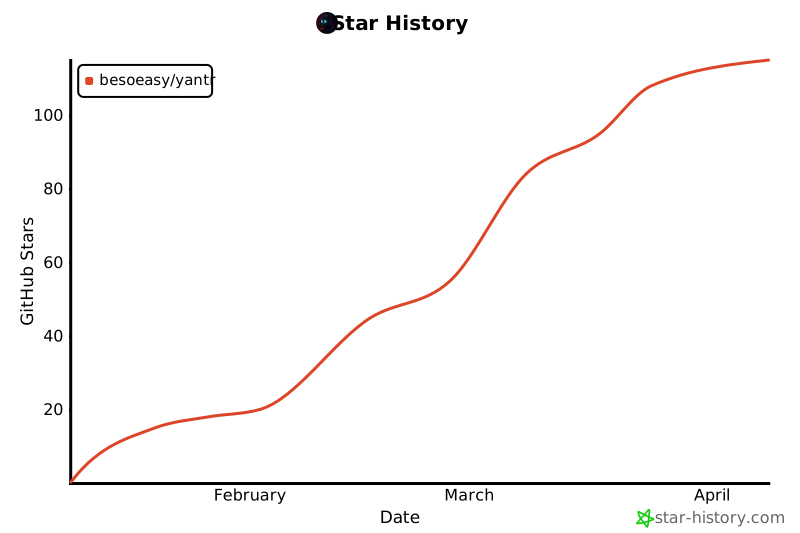
## Star History
[](https://www.star-history.com/#besoeasy/yantr&type=date&legend=top-left)


