


Information
# CodeGPT
[](https://github.com/appleboy/CodeGPT/actions/workflows/testing.yml)
[](https://github.com/appleboy/CodeGPT/actions/workflows/security.yml)
[](https://codecov.io/gh/appleboy/CodeGPT)
[](https://goreportcard.com/report/github.com/appleboy/CodeGPT)
A CLI tool written in [Go](https://go.dev) that generates git commit messages or provides code review summaries using ChatGPT AI (gpt-5, gpt-4o, gpt-4 model). It also automatically installs a [git prepare-commit-msg hook](https://git-scm.com/docs/githooks).
- [繁體中文介紹][1]
- [繁體中文影片][2]
**English** | [繁體中文](./README.zh-tw.md) | [简体中文](./README.zh-cn.md)

## Table of Contents
- [CodeGPT](#codegpt)
- [Table of Contents](#table-of-contents)
- [Features](#features)
- [Installation](#installation)
- [macOS](#macos)
- [Windows](#windows)
- [Install via Script or Binary](#install-via-script-or-binary)
- [**A. Automated Install (Recommended)**](#a-automated-install-recommended)
- [**B. Manual Install (Advanced)**](#b-manual-install-advanced)
- [Configurable Environment Variables](#configurable-environment-variables)
- [From Source](#from-source)
- [Using VSCode Devcontainer](#using-vscode-devcontainer)
- [Configuration](#configuration)
- [Using API Key Helper for Dynamic Credentials](#using-api-key-helper-for-dynamic-credentials)
- [Setup API Key Helper](#setup-api-key-helper)
- [Configure Refresh Interval](#configure-refresh-interval)
- [Gemini-Specific API Key Helper](#gemini-specific-api-key-helper)
- [How It Works](#how-it-works)
- [Priority Order](#priority-order)
- [How to Customize the Default Prompt Folder](#how-to-customize-the-default-prompt-folder)
- [How to Change to Azure OpenAI Service](#how-to-change-to-azure-openai-service)
- [Support for Gemini API Service](#support-for-gemini-api-service)
- [Configuration Options](#configuration-options)
- [Example: Gemini API (default backend)](#example-gemini-api-default-backend)
- [Example: VertexAI Gemini](#example-vertexai-gemini)
- [Support for Anthropic API Service](#support-for-anthropic-api-service)
- [How to Change to Groq API Service](#how-to-change-to-groq-api-service)
- [How to Change to Ollama API Service](#how-to-change-to-ollama-api-service)
- [How to Change to OpenRouter API Service](#how-to-change-to-openrouter-api-service)
- [Usage](#usage)
- [CLI Mode](#cli-mode)
- [Change Commit Message Template](#change-commit-message-template)
- [Git Hook](#git-hook)
- [Install](#install)
- [Uninstall](#uninstall)
- [Code Review](#code-review)
- [Testing](#testing)
- [Star History](#star-history)
- [Reference](#reference)
[1]: https://blog.wu-boy.com/2023/03/writes-git-commit-messages-using-chatgpt/
[2]: https://www.youtube.com/watch?v=4Yei_t6eMZU

## Features
- Supports [Azure OpenAI Service](https://azure.microsoft.com/en-us/products/cognitive-services/openai-service), [OpenAI API](https://platform.openai.com/docs/api-reference), [Gemini][60], [Anthropic][100], [Ollama][41], [Groq][30], and [OpenRouter][50].
- Adheres to the [conventional commits specification](https://www.conventionalcommits.org/en/v1.0.0/).
- Integrates with Git prepare-commit-msg Hook, see the [Git Hooks documentation](https://git-scm.com/book/en/v2/Customizing-Git-Git-Hooks).
- Allows customization of generated diffs by specifying the number of context lines (default: 3).
- Enables file exclusion patterns for git diff operations.
- Translates commit messages into other languages (supports \`en\`, \`zh-tw\`, or \`zh-cn\`).
- Supports SOCKS proxy or custom network HTTP proxy.
- Generates brief code reviews.
- Supports streaming output for real-time token display.
- Allows customization of prompt templates and variables.

## Installation
### macOS
Install via [Homebrew](http://brew.sh/):
\`\`\`sh
brew tap appleboy/tap
brew install codegpt
\`\`\`
### Windows
Install via [Chocolatey](https://chocolatey.org/install):
\`\`\`sh
choco install codegpt
\`\`\`
### Install via Script or Binary
For most systems, you can use an install script **or** manually download a pre-compiled binary.
#### **A. Automated Install (Recommended)**
Run the install script to automatically download and set up the latest release:
\`\`\`sh
bash < <(curl -sSL https://raw.githubusercontent.com/appleboy/CodeGPT/main/install.sh)
\`\`\`
Or download and run manually:
\`\`\`sh
curl -LO https://raw.githubusercontent.com/appleboy/CodeGPT/main/install.sh
chmod +x install.sh
./install.sh
\`\`\`
#### **B. Manual Install (Advanced)**
1. Download the latest pre-compiled binary from the [release page](https://github.com/appleboy/CodeGPT/releases).
2. Change permissions:
\`\`\`sh
chmod 755 codegpt
\`\`\`
3. Move the binary to your system bin directory:
\`\`\`sh
mv codegpt /usr/local/bin/
\`\`\`
4. Confirm installation:
\`\`\`sh
codegpt version
\`\`\`
#### Configurable Environment Variables
| Variable Name | Default Value | Description |
| ------------- | ------------------ | ----------------------------------------------------------------------------- |
| VERSION | latest | The CodeGPT version to install (defaults to latest release) |
| INSTALL_DIR | $HOME/.codegpt/bin | Installation directory |
| INSECURE | unset (disabled) | If set to any value, skips SSL verification. Enabled when variable is present |
Example usage:
\`\`\`sh
# Install with insecure mode enabled (ignoring curl SSL verification):
INSECURE=1 ./install.sh
# Install a specific version to a custom directory:
VERSION=1.1.0 INSTALL_DIR=/opt/codegpt ./install.sh
\`\`\`
The script will:
1. Detect your OS and architecture
2. Download the latest binary
3. Add the binary to your PATH
### From Source
Install from source code:
\`\`\`sh
go install github.com/appleboy/CodeGPT/cmd/codegpt@latest
\`\`\`
### Using VSCode Devcontainer
Add the [feature](https://github.com/kvokka/features/tree/main/src/codegpt) to your \`devcontainer.json\`:
\`\`\`json
"features": \{
"ghcr.io/kvokka/features/codegpt:1": \{\}
\}
\`\`\`
## Configuration
First, create your OpenAI API Key. The [OpenAI Platform](https://platform.openai.com/account/api-keys) allows you to generate a new API Key.

Set the environment variable \`OPENAI_API_KEY\`:
\`\`\`sh
export OPENAI_API_KEY=sk-xxxxxxx
\`\`\`
Alternatively, store your API key in a custom config file:
\`\`\`sh
codegpt config set openai.api_key sk-xxxxxxx
\`\`\`
This will create a \`.codegpt.yaml\` file in your home directory ($HOME/.config/codegpt/.codegpt.yaml). The following options are available:
| Option | Description |
| ------------------------------------------ | ------------------------------------------------------------------------------------------------------------------------------------------------------------------------------ |
| **openai.base_url** | Replace the default base URL (\`https://api.openai.com/v1\`). |
| **openai.api_key** | Generate API key from [openai platform page](https://platform.openai.com/account/api-keys). |
| **openai.api_key_helper** | Shell command to dynamically generate API key (e.g., from password manager or secret service). |
| **openai.api_key_helper_refresh_interval** | Interval in seconds to refresh credentials from \`api_key_helper\` (default: \`900\` seconds / 15 minutes). Set to \`0\` to disable caching. |
| **openai.org_id** | Identifier for this organization sometimes used in API requests. See [organization settings](https://platform.openai.com/account/org-settings). Only for \`openai\` service. |
| **openai.model** | Default model is \`gpt-4o\`, you can change to other custom model (Groq or OpenRouter provider). |
| **openai.proxy** | HTTP/HTTPS client proxy. |
| **openai.socks** | SOCKS client proxy. |
| **openai.timeout** | Default HTTP timeout is \`10s\` (ten seconds). |
| **openai.skip_verify** | Default skip_verify is \`false\`, You can change it to \`true\` to ignore SSL verification. |
| **openai.max_tokens** | Default max tokens is \`300\`. See reference [max_tokens](https://platform.openai.com/docs/api-reference/completions/create#completions/create-max_tokens). |
| **openai.temperature** | Default temperature is \`1\`. See reference [temperature](https://platform.openai.com/docs/api-reference/completions/create#completions/create-temperature). |
| **git.diff_unified** | Generate diffs with \`\` lines of context, default is \`3\`. |
| **git.exclude_list** | Exclude file from \`git diff\` command. |
| **openai.provider** | Default service provider is \`openai\`, you can change to \`azure\`. |
| **output.lang** | Default language is \`en\` and available languages \`zh-tw\`, \`zh-cn\`, \`ja\`. |
| **openai.top_p** | Default top_p is \`1.0\`. See reference [top_p](https://platform.openai.com/docs/api-reference/completions/create#completions/create-top_p). |
| **openai.frequency_penalty** | Default frequency_penalty is \`0.0\`. See reference [frequency_penalty](https://platform.openai.com/docs/api-reference/completions/create#completions/create-frequency_penalty). |
| **openai.presence_penalty** | Default presence_penalty is \`0.0\`. See reference [presence_penalty](https://platform.openai.com/docs/api-reference/completions/create#completions/create-presence_penalty). |
| **openai.stream** | Enable streaming output for real-time token display, default is \`false\`. |
| **prompt.folder** | Default prompt folder is \`$HOME/.config/codegpt/prompt\`. |
### Using API Key Helper for Dynamic Credentials
Instead of storing your API key directly in the config file, you can use a shell command to dynamically retrieve it from a password manager or secret service. This is especially useful for:
- Fetching keys from password managers (1Password, Bitwarden, etc.)
- Using cloud secret services (AWS Secrets Manager, Google Secret Manager, etc.)
- Implementing token rotation and short-lived credentials
- Enhancing security by not storing keys in plain text
#### Setup API Key Helper
Configure a shell command to retrieve your API key:
\`\`\`sh
# Using 1Password CLI
codegpt config set openai.api_key_helper "op read op://vault/openai/api_key"
# Using AWS Secrets Manager
codegpt config set openai.api_key_helper "aws secretsmanager get-secret-value --secret-id openai-key --query SecretString --output text"
# Using Google Cloud Secret Manager
codegpt config set openai.api_key_helper "gcloud secrets versions access latest --secret=openai-api-key"
# Using environment variable
codegpt config set openai.api_key_helper "echo \$MY_OPENAI_KEY"
# Custom script
codegpt config set openai.api_key_helper "/path/to/get-api-key.sh"
\`\`\`
#### Configure Refresh Interval
By default, the API key is cached for 15 minutes (900 seconds) to avoid excessive calls to your secret service:
\`\`\`sh
# Set refresh interval to 5 minutes
codegpt config set openai.api_key_helper_refresh_interval 300
# Set refresh interval to 30 minutes
codegpt config set openai.api_key_helper_refresh_interval 1800
# Disable caching (fetch key every time)
codegpt config set openai.api_key_helper_refresh_interval 0
\`\`\`
#### Gemini-Specific API Key Helper
For Gemini provider, you can set a separate helper:
\`\`\`sh
codegpt config set gemini.api_key_helper "gcloud secrets versions access latest --secret=gemini-key"
codegpt config set gemini.api_key_helper_refresh_interval 600
\`\`\`
#### How It Works
1. **First execution**: CodeGPT runs your helper command and caches the API key in \`~/.config/codegpt/.cache/\` with restrictive permissions (0600)
2. **Subsequent executions**: Within the refresh interval, CodeGPT uses the cached key
3. **After expiration**: CodeGPT automatically re-runs the helper command and updates the cache
4. **Security**: Cache files are stored with owner-only read/write permissions
#### Priority Order
When multiple API key sources are configured, CodeGPT uses this priority:
1. \`openai.api_key_helper\` (if configured)
2. \`openai.api_key\` (static config)
3. \`OPENAI_API_KEY\` environment variable
### How to Customize the Default Prompt Folder
The default prompt folder is located at \`$HOME/.config/codegpt/prompt\`. You can change this to another directory by executing:
\`\`\`sh
codegpt config set prompt.folder /path/to/your/prompt
\`\`\`
To load the prompt files from the custom folder, run:
\`\`\`sh
codegpt prompt --load
\`\`\`
Upon execution, you will see messages similar to the following:
\`\`\`sh
save code_review_file_diff.tmpl to /Users/xxxxx/.config/codegpt/prompt/code_review_file_diff.tmpl
save summarize_file_diff.tmpl to /Users/xxxxx/.config/codegpt/prompt/summarize_file_diff.tmpl
save summarize_title.tmpl to /Users/xxxxx/.config/codegpt/prompt/summarize_title.tmpl
save conventional_commit.tmpl to /Users/xxxxx/.config/codegpt/prompt/conventional_commit.tmpl
\`\`\`
- [code_review_file_diff.tmpl](./prompt/templates/code_review_file_diff.tmpl)
- [summarize_file_diff.tmpl](./prompt/templates/summarize_file_diff.tmpl)
- [summarize_title.tmpl](./prompt/templates/summarize_title.tmpl)
- [conventional_commit.tmpl](./prompt/templates/conventional_commit.tmpl)
### How to Change to Azure OpenAI Service
Get the \`API key\`, \`Endpoint\`, and \`Model deployments\` list from the Azure Resource Management Portal on the left menu.


Update your config file:
\`\`\`sh
codegpt config set openai.provider azure
codegpt config set openai.base_url https://xxxxxxxxx.openai.azure.com/
codegpt config set openai.api_key xxxxxxxxxxxxxxxx
codegpt config set openai.model xxxxx-gpt-4o
\`\`\`
### Support for [Gemini][60] API Service
You can use the Gemini API or VertexAI Gemini service. See the [Gemini API documentation][61] and [VertexAI documentation][63].
Update the following parameters in your config file.
- Please create an API key from the [Gemini API][62] page (for BackendGeminiAPI) or from [VertexAI API Key][64] (for BackendVertexAI).
#### Configuration Options
| Option | Description | Example Value | Required | Default |
| --------------------- | ------------------------------------------------------------------------------------------------ | ------------------ | -------- | ------------------ |
| **openai.provider** | Set to \`gemini\` to use Gemini provider | \`gemini\` | Yes | |
| **gemini.api_key** | API key for Gemini or VertexAI | \`xxxxxxx\` | Yes | |
| **gemini.model** | Model name (see [Gemini models][61]) | \`gemini-2.0-flash\` | Yes | |
| **gemini.backend** | Gemini backend: \`BackendGeminiAPI\` (default, for Gemini API) or \`BackendVertexAI\` (for VertexAI) | \`BackendGeminiAPI\` | No | \`BackendGeminiAPI\` |
| **gemini.project_id** | VertexAI project ID (required if using \`BackendVertexAI\`) | \`my-gcp-project\` | Cond. | |
| **gemini.location** | VertexAI location (required if using \`BackendVertexAI\`) | \`us-central1\` | Cond. | |
#### Example: Gemini API (default backend)
\`\`\`sh
codegpt config set openai.provider gemini
codegpt config set openai.model gemini-2.0-flash
codegpt config set gemini.api_key xxxxxxx
# gemini.backend defaults to BackendGeminiAPI, so you can omit it
\`\`\`
#### Example: VertexAI Gemini
\`\`\`sh
codegpt config set openai.provider gemini
codegpt config set openai.model gemini-2.0-flash
codegpt config set gemini.backend BackendVertexAI
codegpt config set gemini.project_id my-gcp-project
codegpt config set gemini.location us-central1
\`\`\`
[60]: https://ai.google.dev/gemini-api
[61]: https://ai.google.dev/gemini-api/docs
[62]: https://aistudio.google.com/app/apikey
[63]: https://cloud.google.com/vertex-ai/docs/generative-ai/learn/overview
[64]: https://console.cloud.google.com/apis/credentials
\`\`\`mermaid
flowchart TD
User([User])
subgraph CodeGPT
GeminiClient([Gemini Provider])
end
subgraph Google
GeminiAPI([Gemini API])
VertexAI([VertexAI Gemini])
end
User -->|Completion / GetSummaryPrefix| GeminiClient
GeminiClient -- BackendGeminiAPI --> GeminiAPI
GeminiAPI -- Response (text, usage) --> GeminiClient
GeminiClient -- BackendVertexAI --> VertexAI
VertexAI -- Response (text, usage) --> GeminiClient
GeminiClient --> User
\`\`\`
### Support for [Anthropic][100] API Service
Build with the Anthropic API, you can see the [Anthropic API documentation][101]. Update the \`provider\` and \`api_key\` in your config file. Please create an API key from the [Anthropic API][102] page.
\`\`\`sh
codegpt config set openai.provider anthropic
codegpt config set openai.api_key xxxxxxx
codegpt config set openai.model claude-3-5-sonnet-20241022
\`\`\`
See the model list from the [Anthropic API documentation][103].
[100]: https://anthropic.com/
[101]: https://docs.anthropic.com/en/home
[102]: https://anthropic.com/
[103]: https://docs.anthropic.com/en/docs/about-claude/models
### How to Change to [Groq][30] API Service
Get the \`API key\` from the Groq API Service by visiting the [Groq API Service][31]. Update the \`base_url\` and \`api_key\` in your config file.
\`\`\`sh
codegpt config set openai.provider openai
codegpt config set openai.base_url https://api.groq.com/openai/v1
codegpt config set openai.api_key gsk_xxxxxxxxxxxxxx
codegpt config set openai.model llama3-8b-8192
\`\`\`
GroqCloud currently supports the [following models][32]:
1. [Production Models](https://console.groq.com/docs/models#production-models)
2. [Preview Models](https://console.groq.com/docs/models#preview-models)
[30]: https://groq.com/
[31]: https://console.groq.com/keys
[32]: https://console.groq.com/docs/models
### How to Change to Ollama API Service
We can use the Llama3 model from the [Ollama][41] API Service; please visit the [Ollama API Models documentation][40]. Update the \`base_url\` in your config file.
[40]: https://github.com/ollama/ollama/blob/main/docs/openai.md#models
[41]: https://github.com/ollama/ollama
\`\`\`sh
# pull llama3 8b model
ollama pull llama3
ollama cp llama3 gpt-4o
\`\`\`
Try to use the \`Ollama\` API Service:
\`\`\`sh
curl http://localhost:11434/v1/chat/completions \
-H "Content-Type: application/json" \
-d '\{
"model": "gpt-4o",
"messages": [
\{
"role": "user",
"content": "Hello!"
\}
]
\}'
\`\`\`
Update the \`base_url\` in your config file. You don't need to set the \`api_key\` in the config file.
\`\`\`sh
codegpt config set openai.base_url http://localhost:11434/v1
\`\`\`
### How to Change to [OpenRouter][50] API Service
You can see the [supported models list][51], model usage can be paid by users, developers, or both, and may shift in [availability][52]. You can also fetch models, prices, and limits [via API][53].
The following example uses the free model name: \`meta-llama/llama-3-8b-instruct:free\`
\`\`\`sh
codegpt config set openai.provider openai
codegpt config set openai.base_url https://openrouter.ai/api/v1
codegpt config set openai.api_key sk-or-v1-xxxxxxxxxxxxxxxx
codegpt config set openai.model google/gemini-3-flash-preview
\`\`\`
[50]: https://openrouter.ai/
[51]: https://openrouter.ai/docs#models
[52]: https://openrouter.ai/terms#services
[53]: https://openrouter.ai/api/v1/models
To include your app in openrouter.ai rankings and show it in rankings on openrouter.ai, you can set the \`openai.headers\` in your config file:
\`\`\`sh
codegpt config set openai.headers "HTTP-Referer=https://github.com/appleboy/CodeGPT X-Title=CodeGPT"
\`\`\`
- **HTTP-Referer**: Optional, for including your app in openrouter.ai rankings.
- **X-Title**: Optional, for showing in rankings on openrouter.ai.
## Usage
There are two methods for generating a commit message using the \`codegpt\` command: CLI mode and Git Hook.
### CLI Mode
You can call \`codegpt\` directly to generate a commit message for your staged changes:
\`\`\`sh
git add
codegpt commit --preview
\`\`\`
The commit message is shown below:
\`\`\`sh
Summarize the commit message using the gpt-4o model
We are trying to summarize a git diff
We are trying to summarize a title for the pull request
================Commit Summary====================
feat(cmd): Add preview flag and remove disableCommit flag in commit command and template file.
- Add a \`preview\` flag to the \`commit\` command
- Remove the \`disableCommit\` flag from the \`prepare-commit-msg\` template file
==================================================
Write the commit message to .git/COMMIT_EDITMSG file
\`\`\`
Or translate all git commit messages into a different language (\`Traditional Chinese\`, \`Simplified Chinese\`, or \`Japanese\`):
\`\`\`sh
codegpt commit --lang zh-tw --preview
\`\`\`
Consider the following outcome:
\`\`\`sh
Summarize the commit message using the gpt-4o model
We are trying to summarize a git diff
We are trying to summarize a title for the pull request
We are trying to translate a git commit message to Traditional Chinese language
================Commit Summary====================
功能:重構 codegpt commit 命令標記
- 將「codegpt commit」命令新增「預覽」標記
- 從「codegpt commit」命令中移除「--disableCommit」標記
==================================================
Write the commit message to .git/COMMIT_EDITMSG file
\`\`\`
You can replace the tip of the current branch by creating a new commit. Just use the \`--amend\` flag:
\`\`\`sh
codegpt commit --amend
\`\`\`
Enable streaming output to see tokens as they arrive in real-time, rather than waiting for the full response:
\`\`\`sh
codegpt commit --stream
\`\`\`
Or enable it globally via config:
\`\`\`sh
codegpt config set openai.stream true
\`\`\`
The \`--stream\` flag also works with the \`review\` command:
\`\`\`sh
codegpt review --stream
\`\`\`
## Agent Skill Integration
CodeGPT provides agent skills such as \`/commit-message\` that generate conventional commit messages from your staged changes. In [Claude Code](https://docs.anthropic.com/en/docs/claude-code), simply type \`/commit-message\` to analyze your staged diff and produce a well-formatted commit message with the appropriate prefix, scope, and summary.
The skill definitions are maintained in a separate repository: [appleboy/skills](https://github.com/appleboy/skills).
## Change Commit Message Template
The default commit message template is as follows. The \`summarize_prefix\` variable outputs the conventional commit prefix with scope in \`prefix(scope)\` format (e.g., \`feat(cmd)\`, \`fix(git)\`, \`docs(readme)\`):
\`\`\`tmpl
\{\{ .summarize_prefix \}\}: \{\{ .summarize_title \}\}
\{\{ .summarize_message \}\}
\`\`\`
Change the format with a template string using the \`--template_string\` parameter:
\`\`\`sh
codegpt commit --preview --template_string \
"[\{\{ .summarize_prefix \}\}]: \{\{ .summarize_title \}\}"
\`\`\`
Change the format with a template file using the \`--template_file\` parameter:
\`\`\`sh
codegpt commit --preview --template_file your_file_path
\`\`\`
Add a custom variable to the git commit message template:
\`\`\`sh
\{\{ .summarize_prefix \}\}: \{\{ .summarize_title \}\}
\{\{ .summarize_message \}\}
\{\{ if .JIRA_URL \}\}\{\{ .JIRA_URL \}\}\{\{ end \}\}
\`\`\`
Add a custom variable to the git commit message template using the \`--template_vars\` parameter:
\`\`\`sh
codegpt commit --preview --template_file your_file_path --template_vars \
JIRA_URL=https://jira.example.com/ABC-123
\`\`\`
Load a custom variable from a file using the \`--template_vars_file\` parameter:
\`\`\`sh
codegpt commit --preview --template_file your_file_path --template_vars_file your_file_path
\`\`\`
See the \`template_vars_file\` format as follows:
\`\`\`env
JIRA_URL=https://jira.example.com/ABC-123
\`\`\`
### Git Hook
You can also use the prepare-commit-msg hook to integrate \`codegpt\` with Git. This allows you to use Git normally and edit the commit message before committing.
#### Install
To install the hook in the Git repository:
\`\`\`sh
codegpt hook install
\`\`\`
#### Uninstall
To remove the hook from the Git repository:
\`\`\`sh
codegpt hook uninstall
\`\`\`
Stage your files and commit after installation:
\`\`\`sh
git add
git commit
\`\`\`
\`codegpt\` will generate the commit message for you and pass it back to Git. Git will open it with the configured editor for you to review/edit it. Then, to commit, save and close the editor!
\`\`\`sh
$ git commit
Summarize the commit message using the gpt-4o model
We are trying to summarize a git diff
We are trying to summarize a title for the pull request
================Commit Summary====================
Improve user experience and documentation for OpenAI tools
- Add download links for pre-compiled binaries
- Include instructions for setting up OpenAI API key
- Add a CLI mode for generating commit messages
- Provide references for OpenAI Chat completions and ChatGPT/Whisper APIs
==================================================
Write the commit message to .git/COMMIT_EDITMSG file
[main 6a9e879] Improve user experience and documentation for OpenAI tools
1 file changed, 56 insertions(+)
\`\`\`
### Code Review
You can use \`codegpt\` to generate a code review message for your staged changes:
\`\`\`sh
codegpt review
\`\`\`
Or translate all code review messages into a different language (\`Traditional Chinese\`, \`Simplified Chinese\`, or \`Japanese\`):
\`\`\`sh
codegpt review --lang zh-tw
\`\`\`
See the following result:
\`\`\`sh
Code review your changes using gpt-4o model
We are trying to review code changes
PromptTokens: 1021, CompletionTokens: 200, TotalTokens: 1221
We are trying to translate core review to Traditional Chinese language
PromptTokens: 287, CompletionTokens: 199, TotalTokens: 486
================Review Summary====================
總體而言,此程式碼修補似乎在增加 Review 指令的功能,允許指定輸出語言並在必要時進行翻譯。以下是需要考慮的潛在問題:
- 輸出語言沒有進行輸入驗證。如果指定了無效的語言代碼,程式可能會崩潰或產生意外結果。
- 此使用的翻譯 API 未指定,因此不清楚是否存在任何安全漏洞。
- 無法處理翻譯 API 調用的錯誤。如果翻譯服
==================================================
\`\`\`
Example php code review:
\`\`\`php
\{$cmd\}";
\}
?>
\`\`\`
code review result:
\`\`\`sh
================Review Summary====================
Code review:
1. Security: The code is vulnerable to command injection attacks as the user input is directly used in the shell_exec() function. An attacker can potentially execute malicious commands on the server by injecting them into the 'ip' parameter.
2. Error handling: There is no error handling in the code. If the ping command fails, the error message is not displayed to the user.
3. Input validation: There is no input validation for the 'ip' parameter. It should be validated to ensure that it is a valid IP address or domain name.
4. Cross-platform issues: The code assumes that the server is either running Windows or *nix operating systems. It may not work correctly on other platforms.
Suggestions for improvement:
1. Use escapeshellarg() function to sanitize the user input before passing it to shell_exec() function to prevent command injection.
2. Implement error handling to display error messages to the user if the ping command fails.
3. Use a regular expression to validate the 'ip' parameter to ensure that it is a valid IP address or domain name.
4. Use a more robust method to determine the operating system, such as the PHP_OS constant, which can detect a wider range of operating systems.
==================================================
\`\`\`
## Testing
Run the following command to test the code:
\`\`\`sh
make test
\`\`\`
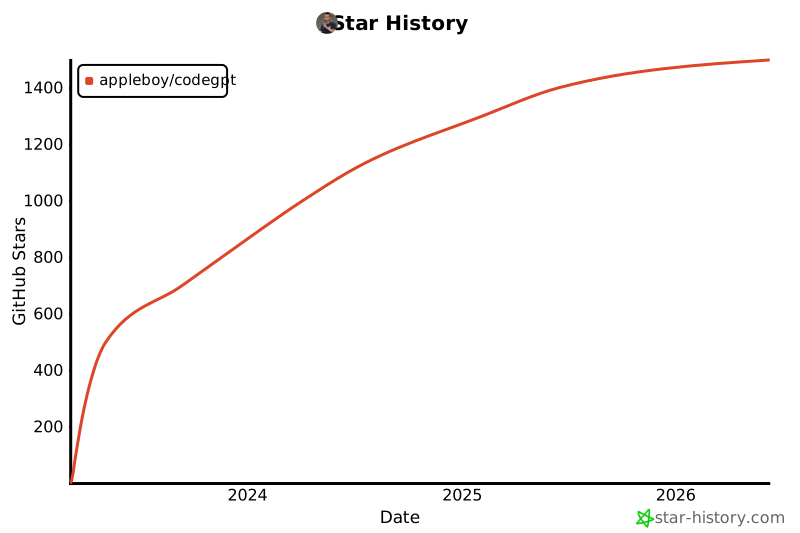
## Star History
[](https://star-history.com/#appleboy/codegpt&Date)
## Reference
- [OpenAI Chat completions documentation](https://platform.openai.com/docs/guides/chat).
- [Introducing ChatGPT and Whisper APIs](https://openai.com/blog/introducing-chatgpt-and-whisper-apis)