




Information
# SwiftAIAgent
An AI Agent framework in Swift
## The mission
Leverage \`Swift\` to build AI Agent systems that are both simple and swift.
## Usage
There are demos in \`main.swift\` in \`Client\` target. You can run them directly to understand how it works.
Please note, need to configure the environment varibales \`GEMINI_API_KEY\`, \`GitHubToken\`(for GitHub MCP Server), \`cx\` & \`key\` (for Google search tool).
### Auto workflow
\`\`\`swift
let autoWorkflow = AutoWorkflow(model: model, goal: "Write an article about history of AI and output it in markdown format")
try await autoWorkflow.run()
\`\`\`
The AI model figures out what's the best to do for the goal. It only support sequence flow at the moment in auto mode.
#### What this can do depends on the tools/mcp servers we configure. For example, it can do the following(Please refer to the code examples in Client target):
\`\`\`swift
enum Example \{
/// Generate scientific article
case summariseAIHistory
/// Creative writing
case ceativeWriting
/// Summarise political event
case summariseMeetingWithImage
/// Search latest news
case latestNewsInSydney
/// Search and save results to GoogleSheets
case saveSearchResultToGoogleSheets
/// Plan a trip using search tools
case tripPlanning
/// Demo of using MCP Servers
case getGitHubRepoTags
/// Add image, text to Google Slides
case addImageAndTextToSlides
/// Auto generate Google slides for content
case autoSlides
/// Create Google docs
case autoDocs
/// Search flights
case searchFlights
\}
\`\`\`
You can also check out [this website](https://deepresearch.timwang.au), which is built on top of this agent framework.
### Mannal workflow
\`\`\`swift
let draftAgent = AIAgent(title: "Draft article",
model: gemini,
instruction: "Please draft an article about the history of AI")
let reviewAgent = AIAgent(title: "Review",
model: gemini,
instruction: "Please review the draft and give your feedback.")
let finaliserAgent = AIAgent(title: "Finaliser",
model: gemini,
instruction: "Please finalise this article based on the draft and review")
await finaliserAgent.add(input: draftAgent.id)
let draftStep = Workflow.Step.single(draftAgent)
let reviewStep = Workflow.Step.single(reviewAgent)
let finaliseStep = Workflow.Step.single(finaliserAgent)
let workflow = Workflow(step: .sequence([draftStep, reviewStep, finaliseStep]))
let result = try await workflow.run(prompt: "Let's write this artile")
\`\`\`
Orchestrate workflows manually. Support sequence, parrallel and condintinal flow types.
## Structured output
Use \`@AIModelSchema\` macro to generate json schema and feed to LLM model to get structured data.
For example,
\`\`\`swift
/// Task that is broken down from a goal
@AIModelSchema
struct AITask \{
/// A descriptive name of the task
let name: String
/// The details a task needs to do
let details: String
/// The condition to run this step
let condition: String?
/// Run sub tasks in parralel
let runSubTasksInParallel: Bool?
/// Sub tasks, an recursive structure to indicate the excute orders of the tasks
let subTasks: [AISubTask]?
\}
\`\`\`
will generate schema below:
\`\`\`swift
extension AITask: AIModelSchema \{
static var outputSchema: String \{
"""
\{"type":"object","description":"Task that is broken down from a goal","properties":\{"name":\{"type":"string","description":"A descriptive name of the task"\},"details":\{"type":"string","description":"The details a task needs to do"\},"condition":\{"type":"string","description":"The condition to run this step"\},"runSubTasksInParallel":\{"type":"boolean","description":"Run sub tasks in parralel"\},"subTasks":\{"type":"array","description":"Sub tasks, an recursive structure to indicate the excute orders of the tasks","items":\(AISubTask.outputSchema)\}\},"required":["name","details"]\}
"""
\}
\}
\`\`\`
## Function/Tool Calling
### Define tools
Once mark a type using \`@AITool\`, all the functions of that type that are not private will be made available to LLM.
\`\`\`swift
@AITool
struct ToolStruct \{
/// Get weather of the city
/// - Parameters:
/// - city: The city
/// - Returns: Weather of the city
func getWeather(city: String) -> String \{
"It's raining in Sydney"
\}
\}
\`\`\`
### Configure tool to agent and run it by agent automatically if needed.
\`\`\`swift
let gemini = GeminiSDK(model: "gemini-2.5-flash",
apiKey: ProcessInfo.processInfo.environment["GEMINI_API_KEY"] ?? "")
let context = AIAgentContext("Get weather")
let agent = AIAgent(title: "Weahter Agent",
model: gemini,
tools: [ToolStruct()],
context: context,
instruction: "")
let result = try await agent.run(prompt: "Get weather for Sydney")
print(result)
\`\`\`
## Use MCP Servers
\`\`\`swift
let gemini = GeminiSDK(model: geminiModel,
apiKey: geminiAPIKey)
let gitHubURL = URL(string: "https://api.githubcopilot.com/mcp/")!
let testAgent = try await AIAgent(title: "Draft article",
model: gemini,
mcpServers: [.http(url: gitHubURL, token: gitHubToken)],
instruction: "Get all the tags of this repo https://github.com/ShenghaiWang/SwiftLlama")
let step = Workflow.Step.single(testAgent)
let workflow = Workflow(step: step)
let result = try await workflow.run(prompt: "start")
\`\`\`
## Early stage
The project currently supports basic workflows, but it remains in an early phase.
Features like tool calling, MCP integration, and other improvements are coming soon.
If you’d like to join this mission, feel free to reach out.
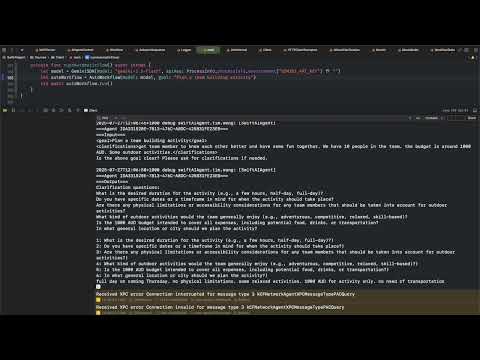
## Watch a sample workflow run
[](https://www.youtube.com/watch?v=te_CZrwrphs)