# ️ Context Forge
**CLI tool for instant Claude Code project scaffolding with context engineering best practices**
[](https://www.npmjs.com/package/context-forge)
[](https://www.npmjs.com/package/context-forge)
[](https://opensource.org/licenses/MIT)
[](https://www.typescriptlang.org/)
[](https://nodejs.org/)
[](https://github.com/webdevtodayjason/context-forge/releases)
[](https://github.com/webdevtodayjason/context-forge/pulls)
[](https://github.com/webdevtodayjason/context-forge)

Transform your project ideas into AI-ready applications with intelligent context engineering
Optimized for Claude Code with deep integration for slash commands, hooks, and PRPs
Also supports Cursor, Windsurf, Cline, Copilot, Gemini, and more AI coding assistants
What's New in v3.2.9
Nuxt 4 Support
NEW: Full Nuxt 4 Integration
Complete support for Nuxt 4 with Vue 3 and modern development!
- ️ New app/ directory structure support
- Enhanced TypeScript integration
- Vue 3 Composition API guidelines
- Auto-imports and server-side rendering
- Nuxt-specific validation commands
context-forge init
Select "Nuxt 4" as frontend framework
|
AI-Powered PRP Generation
Continued: context-forge init --ai-prp
Intelligent, feature-specific PRPs with AI enhancement!
- OpenAI & Anthropic Claude integration
- Secure API key management with encryption
- Feature-specific implementation strategies
- Real-time progress feedback
- ️ Timeout handling & fallback systems
context-forge ai-keys --provider openai
|
Enhanced Claude Code Integration
25+ Slash Commands
Comprehensive command library:
- PRPs: create, execute, validate, parallel
- Dev: prime-context (NEW: architect mode), debug-issue, review-code
- Git: smart-commit, create-pr
- Orchestration: orchestrate-status, team-health
- Enhancement: track-features, update-progress
|
7 Claude Code Hooks
context-forge copy-hooks
- PreCompact: Preserve context
- ContextRotation: Smart file switching
- PreSubmit: Quality gates
- PRPTracking: Progress monitoring
- DartProgressUpdater: Auto task progress
- AutoTaskCommenter: Smart task docs
- TaskCodeMapper: File-task mapping
|
Complete Project Structure
Core Files
- CLAUDE.md
- Docs/
- PRPs/
- ai_docs/
|
.claude/commands/
- PRPs/
- development/
- checkpoints/
- migration/
|
.claude/hooks/
- PreCompact.py
- ContextRotation.py
- PreSubmit.py
- DartProgressUpdater.py
- AutoTaskCommenter.py
- TaskCodeMapper.py
- MigrationHooks/
|
PRP Support for 6 AI IDEs!
Product Requirement Prompts (PRP) now available for Claude, Cursor, Windsurf, Cline, Copilot & Gemini!






Structured feature implementation with validation gates across all major AI coding assistants!
[Features](#-features) • [Quick Start](#-quick-start) • [Documentation](#-documentation) • [Credits](#-credits)
---
## Overview
Context Forge is a powerful CLI tool that bridges the gap between project requirements and AI-assisted development. By implementing Andre Karpathy's context engineering principles, it generates comprehensive documentation structures that enable AI IDEs to understand and build your project efficiently—without hallucinations or context confusion.
### Why Choose Context Forge?
** Universal AI IDE Support** - Works with ALL major AI coding assistants
** Zero Configuration** - Intelligent defaults for each IDE
** One Command** - Generate configs for multiple IDEs simultaneously
** Format Conversion** - Switch between IDEs without starting over
** Claude Hooks Integration** - Seamless context preservation during compaction
** No Lock-in** - Your project, your choice of AI assistant
### Supported AI IDEs & Assistants
> **Coming Soon:** Amazon CodeWhisperer, Tabnine, and more!
### IDE Configuration Guides
Need help understanding how each IDE uses its configuration? Check out our detailed guides:
- **[ Claude Code Guide](./docs/ide-configs/claude/)** - Full PRP support, validation system, tech-stack templates
- **[ Cursor IDE Guide](./docs/ide-configs/cursor/)** - PRP support, MDC format, hierarchical rules
- **[ Windsurf Guide](./docs/ide-configs/windsurf/)** - PRP support, Cascade AI integration, workflows
- **[ Cline Guide](./docs/ide-configs/cline/)** - PRP support, context management, code patterns, advanced commands
- **[ Roo Code Guide](./docs/ide-configs/roo/)** - Workspace rules, YAML configuration, team settings
- **[ Gemini Guide](./docs/ide-configs/gemini/)** - PRP support, hierarchical context, CLI commands, Code Assist integration
- **[ GitHub Copilot Guide](./docs/ide-configs/copilot/)** - Custom instructions, VS Code settings, language-specific rules
### Claude Code Advanced Features Documentation
**[ Complete Claude Features Guide](./docs/claude-features/README.md)** - Master the new advanced features:
- **[ Slash Commands Reference](./docs/claude-features/slash-commands.md)** - 20+ pre-built commands for rapid development
- **[ PRP Runner Guide](./docs/claude-features/prp-runner.md)** - Automated PRP execution with validation gates
- **[ Enhanced PRP Templates](./docs/claude-features/enhanced-prp-templates.md)** - Four specialized templates for different scenarios
- **[ Orchestration Workflow](./docs/claude-features/orchestration-workflow.md)** - How all components work together
## AI-Powered PRP Generation (NEW in v3.2.8)
Transform your project development with intelligent, feature-specific **Product Requirement Prompts (PRPs)** powered by OpenAI and Anthropic Claude.
### What are AI-Powered PRPs?
Unlike template-based PRPs, AI-powered PRPs are dynamically generated for each specific feature in your project, containing:
- **Feature-specific implementation strategies** tailored to your tech stack
- **Intelligent gotchas and best practices** based on your architecture
- **Custom validation approaches** optimized for the feature type
- **Relevant documentation links** curated by AI
- **Complexity assessments** and dependency analysis
### Quick Setup
\`\`\`bash
# 1. Set up your AI provider (one-time setup)
context-forge ai-keys --provider openai
# OR
context-forge ai-keys --provider anthropic
# 2. Initialize project with AI-powered PRPs
context-forge init --ai-prp
# Your API keys are securely encrypted and stored in ~/.context-forge-keys
\`\`\`
### Secure Key Management
- **AES-256-CBC encryption** for API key storage
- **User-specific salt generation** for enhanced security
- **Cross-project key sharing** - set up once, use everywhere
- **Multi-provider support** - OpenAI, Anthropic Claude, and more coming soon
### Real-time Generation Process
Watch as Context Forge generates intelligent PRPs for each feature:
\`\`\`
Generating AI PRP for: User Authentication & Authorization...
AI content generated for: User Authentication & Authorization
Generated: PRPs/feature-auth-prp.md
Generating AI PRP for: Google Drive Cloud Streaming...
AI content generated for: Google Drive Cloud Streaming
Generated: PRPs/feature-google-drive-cloud-streaming-prp.md
\`\`\`
### Example: Feature-Specific Content
**Traditional Template PRP:**
\`\`\`markdown
# TODO: Add implementation details
# TODO: Add data models based on requirements
\`\`\`
**AI-Powered PRP for Google Drive Integration:**
\`\`\`markdown
### AI-Generated Implementation Strategy
Leverage Google Drive API for file organization, streaming, and redundancy.
Use Google's Picker API for intelligent folder structure management.
Implement JWT for access control.
### ️ AI-Identified Gotchas
- Make sure to have proper error handling for API failures
- Ensure you're not exceeding Google Drive API's rate limits
- Be careful with user's OAuth tokens
### AI-Recommended Best Practices
- Encrypt OAuth tokens
- Use Google's recommended best practices for Drive API
- Always validate files before streaming
\`\`\`
### ️ Fallback & Reliability
- **30-second timeout** with automatic fallback to template content
- **Progress feedback** so you always know what's happening
- **Graceful error handling** ensures project generation never fails
- **Offline mode** - AI enhancement is always optional
## Features
### Core Features
- **No AI Dependencies** - Works completely offline without API keys
- **Multi-IDE Support** - Generate configs for multiple AI IDEs at once
- **Interactive CLI** - Guided project setup with IDE selection
- **Template-based Generation** - IDE-specific documentation formats
- ️ **Multiple Tech Stacks** - Support for 9+ frameworks with specific configurations
- **Structured Output** - Organized documentation following each IDE's conventions
- **Fast Setup** - Go from zero to AI-ready project in minutes
- **Technology Migration** - Safe migration planning between tech stacks
- **Retrofit Existing Projects** - Analyze and upgrade existing codebases with AI documentation
- ️ **Smart Project Detection** - Automatically detects new vs existing projects
- **Transparent File Operations** - Shows actual file paths and comprehensive logging
### Advanced Features
- **AI-Powered PRP Generation** - Intelligent, feature-specific PRPs with OpenAI & Anthropic (NEW in v3.2.8!)
- **PRP Integration** - Product Requirement Prompts with validation loops (Claude, Cursor, Windsurf, Cline, Copilot & Gemini)
- **Secure API Key Management** - AES-256-CBC encrypted storage for AI provider keys
- **Validation System** - Built-in code quality checks and gates
- **Human-in-the-Loop Checkpoints** - Pause for verification at critical milestones
- **Claude Code Hooks** - PreCompact, ContextRotation, PreSubmit, and PRPTracking hooks
- **20+ Slash Commands** - Comprehensive command library for rapid development
- **Tech-Stack Specific Templates** - Optimized CLAUDE.md for each framework
- **Comprehensive Reporting** - Validation reports and progress tracking
- **Phased Migration Plans** - Step-by-step migration with rollback strategies
- **Extensible Architecture** - Easy to add new tech stacks and features
## Claude Hooks Manager Integration
Context Forge provides deep integration with [Claude Hooks Manager](https://github.com/webdevtodayjason/claude-hooks) through 4 powerful hooks that enhance your development workflow and maintain context throughout long sessions.
### The 4 Claude Code Hooks
#### 1. **PreCompact Hook** - Context Preservation
With Claude Code v1.0.48+, the PreCompact hook ensures your PRPs and project context survive conversation compaction:
- Critical project structure persists
- Current implementation stage maintained
- Validation gates remain active
#### 2. **ContextRotation Hook** - Smart File Management
Intelligently manages which files stay in context as you work:
- Prioritizes relevant files based on current task
- Automatically rotates less relevant files out
- Preserves critical configuration files
#### 3. **PreSubmit Hook** - Quality Gates
Runs validation before code submission:
- Syntax and type checking
- Test execution
- Coverage requirements
- Security scanning
#### 4. **PRPTracking Hook** - Progress Monitoring
Tracks PRP implementation progress:
- Monitors task completion
- ⏱️ Time tracking per feature
- Automatic status updates
- Milestone achievements
### NEW: Dart Integration Hooks (v3.2.1)
When **Dart task management** is enabled, Context Forge generates additional hooks for comprehensive task tracking:
#### 5. **DartProgressUpdater Hook** - Automatic Task Progress
Automatically updates Dart task progress based on code changes:
- Detects tasks from file path patterns
- Updates task status on file modifications
- Tracks git commit messages for task completion
- Maintains progress history and suggestions
#### 6. **AutoTaskCommenter Hook** - Detailed Task Documentation
Adds intelligent comments to Dart tasks with code analysis:
- Analyzes code structure and complexity
- Tracks functions added/modified and line changes
- Categorizes changes by project area (auth, API, UI, etc.)
- Creates milestone comments for builds/tests/commits
#### 7. **TaskCodeMapper Hook** - Intelligent File-Task Mapping
Maintains smart mapping between Dart tasks and code files:
- Infers task categories from file paths and content
- Confidence-based task assignment suggestions
- Project-specific pattern recognition
- Learning from successful mappings
**Enable Dart Integration:**
\`\`\`bash
context-forge init
# Select "Enable Dart task integration? Yes"
\`\`\`
**Generated Dart Integration Files:**
- \`.claude/dart_progress.json\` - Task progress tracking
- \`.claude/task_mapping.json\` - File-to-task relationships
- \`.claude/task_comments.json\` - Automated task comments
- \`.claude/task_suggestions.json\` - AI-generated task suggestions
### Setup
\`\`\`bash
# Generate project with hooks
context-forge init # Select "Enable Claude Code hooks? Yes"
# Or copy hooks from another project
context-forge copy-hooks --source ../claude-hooks-repo/hooks
# Hooks are created in:
# .claude/hooks/
\`\`\`
This integration is especially powerful for:
- Long-running development sessions
- Complex multi-phase implementations
- Team projects requiring consistency
- Migration projects with checkpoints
## Human-in-the-Loop Checkpoints
Context Forge introduces a powerful checkpoint system that pauses AI development at critical milestones for human verification, ensuring you maintain control over the implementation process.
### Why Checkpoints?
- **Prevent Breaking Changes**: Verify database migrations before data modification
- **Quality Assurance**: Review architectural decisions before proceeding
- **Safety First**: Human approval for production deployments
- **Learning Opportunity**: Understand what the AI has implemented
### How Checkpoints Work
1. **Automatic Triggers**: AI pauses at predefined critical points
2. **Manual Checkpoints**: Use \`/checkpoint\` command anytime
3. **Verification Request**: AI presents what was done and what needs testing
4. **Human Decision**: Approve to continue or request fixes
### Checkpoint Commands
- \`/checkpoint [description]\` - Create manual checkpoint
- \`/should-checkpoint\` - AI asks if checkpoint is needed
- \`/milestone-gate [milestone]\` - Major milestone verification
### Example Checkpoint Flow
\`\`\`
CHECKPOINT: Human Verification Required
Analytics Dashboard - I've completed database schema setup:
What I've Accomplished:
- Created PostgreSQL schema with 5 tables
- Set up foreign key relationships
- Added indexes for query optimization
Please Test:
1. Run: npm run db:migrate
2. Check tables exist: psql -c "\dt"
3. Verify foreign keys: psql -c "\d+ users"
Critical Verification Points:
- [ ] All tables created successfully
- [ ] Foreign keys properly linked
- [ ] No data loss from existing tables
Please respond:
- "Approved" - Continue to next task
- "Issues: [description]" - Fix before proceeding
\`\`\`
### Configuring Checkpoints
Checkpoints are configured during project initialization or can be added to existing projects:
\`\`\`yaml
# .context-forge/checkpoints.yaml
checkpoints:
- name: "Database Migration"
phase: "infrastructure"
requires_approval: true
validation_steps:
- "Run migration scripts"
- "Verify data integrity"
- "Check rollback procedures"
\`\`\`
## Installation
\`\`\`bash
npm install -g context-forge
\`\`\`
[](https://npmjs.org/package/context-forge)
## Quick Start
### Prerequisites
- Node.js 18+ and npm 7+
- Git (for version control)
- A code editor (VS Code recommended)
### Basic Usage
\`\`\`bash
# Initialize a new project
context-forge init
# Initialize with AI-powered PRPs (optional)
context-forge init --ai-prp
# Set up AI provider keys (optional)
context-forge ai-keys
# Or use npx without installation
npx context-forge init
\`\`\`
**Note**: Context Forge is a CLI tool and should be installed globally. Do not install it as a project dependency with \`npm install context-forge\` as this will add unnecessary files to your project.
\`\`\`bash
# Initialize in current directory
context-forge init
# Specify output directory
context-forge init --output ./my-project
# Use with existing PRD file
context-forge init --prd ./requirements.md
# Skip interactive prompts with config
context-forge init --config ./context-forge.json
# Run validation on existing project
context-forge validate
# Retrofit existing projects with AI-optimized documentation
context-forge analyze
# Execute PRPs with Claude Code for one-pass implementation
context-forge run-prp feature-name
# NEW: Plan technology migration
context-forge migrate --target "Next.js"
# NEW: Copy Claude Code hooks from another project
context-forge copy-hooks --source ../claude-hooks-repo/hooks
# NEW: Set up AI provider keys for enhanced PRP generation
context-forge ai-keys --provider openai
context-forge ai-keys --provider anthropic
\`\`\`
## Usage Examples
### Example 1: SaaS Dashboard Project
\`\`\`bash
$ context-forge init
? Project name: Analytics Dashboard
? Project type: fullstack
? Project description: Real-time analytics dashboard with data visualization
? How would you like to provide the PRD? Create new PRD
? Frontend framework: nextjs
? Backend framework: fastapi
? Database: postgresql
? Select features: authentication, dashboard, realtime-updates, data-export
? Project timeline: standard
? Team size: small
? Enable PRP generation? Yes
? Enable AI-powered PRP generation? Yes
? Enable validation system? Yes
? Enable Human-in-the-Loop checkpoints? Yes
? Enable Claude Code hooks? Yes
Project initialized successfully!
Generated files:
- CLAUDE.md (Next.js 15 specific configuration)
- Docs/Implementation.md (4 development stages)
- Docs/project_structure.md
- PRPs/base.md (Implementation prompt with validation gates)
- .claude/commands/ (20+ slash commands)
- .claude/hooks/ (4 Claude Code hooks)
- .context-forge/config.json
Next steps:
1. cd analytics-dashboard
2. Set up AI keys (optional): context-forge ai-keys
3. Review CLAUDE.md for project rules
4. Use /prime-context to load project knowledge and activate architect mode
5. Start with Stage 1 in Docs/Implementation.md
\`\`\`
### Example 2: API-Only Microservice
\`\`\`bash
$ context-forge init --output user-service
? Project name: User Service
? Project type: api
? Project description: User management microservice with JWT auth
? Frontend framework: none
? Backend framework: express
? Database: mongodb
? Authentication method: jwt
? Enable Docker support? Yes
? Enable GitHub Actions? Yes
Generated structure:
user-service/
├── CLAUDE.md # Express.js specific rules
├── Docs/
├── PRPs/
├── Dockerfile
├── docker-compose.yml
└── .github/workflows/
\`\`\`
### Example 3: Nuxt 4 Vue Application
\`\`\`bash
$ context-forge init --output nuxt-dashboard
? Project name: Analytics Dashboard
? Project type: fullstack
? Project description: Modern analytics dashboard with real-time data
? Frontend framework: nuxt4 # NEW: Nuxt 4 option
? Styling framework: tailwind
? State management: pinia
? Backend framework: fastapi
? Database: postgresql
? Authentication method: jwt
? Enable AI-powered PRP generation? Yes
Generated structure:
nuxt-dashboard/
├── CLAUDE.md # Nuxt 4 + Vue 3 specific rules
├── Docs/
├── PRPs/
│ ├── nuxt-dashboard-prp.md
│ └── feature-auth-prp.md # AI-enhanced for Nuxt 4
└── .claude/commands/ # 25+ slash commands
Nuxt 4 Features Included:
- New app/ directory structure documented
- Vue 3 Composition API guidelines
- TypeScript integration with auto-imports
- SSR and data fetching best practices
- Pinia state management setup
\`\`\`
### Example 4: Using Configuration File
\`\`\`bash
# context-forge.json
\{
"projectName": "E-Commerce Platform",
"projectType": "fullstack",
"description": "Modern e-commerce platform with AI recommendations",
"prd": \{
"content": "# E-Commerce Platform\n\n## Overview\n...",
"features": [
\{
"id": "auth",
"name": "User Authentication",
"priority": "must-have",
"complexity": "medium"
\},
\{
"id": "catalog",
"name": "Product Catalog",
"priority": "must-have",
"complexity": "complex"
\},
\{
"id": "cart",
"name": "Shopping Cart",
"priority": "must-have",
"complexity": "medium"
\},
\{
"id": "ai-recommendations",
"name": "AI Product Recommendations",
"priority": "should-have",
"complexity": "complex"
\}
]
\},
"techStack": \{
"frontend": "react",
"backend": "django",
"database": "postgresql",
"cache": "redis",
"search": "elasticsearch"
\},
"extras": \{
"prp": true,
"validation": true,
"docker": true,
"cicd": true,
"testing": true
\}
\}
# Run with config
$ context-forge init --config context-forge.json --output ecommerce-platform
\`\`\`
## Real-World Scenarios
### Scenario 1: Startup MVP
You're building an MVP for a startup. You need to move fast but maintain quality:
\`\`\`bash
# 1. Initialize with MVP timeline
context-forge init --preset startup-mvp
# 2. Review generated Implementation.md
cat Docs/Implementation.md
# Shows 2-week sprint plan with daily tasks
# 3. Start development with Claude Code
# Open CLAUDE.md in Claude Code
# Follow Stage 1 tasks systematically
# 4. Validate progress daily
context-forge validate --levels syntax,tests
\`\`\`
### Scenario 2: Enterprise Migration
Migrating a legacy system to modern stack:
\`\`\`bash
# 1. Create detailed PRD first
context-forge init --prd legacy-migration-prd.md
# 2. Select enterprise options
# - Choose 'enterprise' timeline
# - Enable all validation options
# - Select comprehensive testing
# 3. Generated structure includes:
# - Migration strategy in Implementation.md
# - Rollback procedures
# - Comprehensive test suites
# - Security audit checklists
\`\`\`
### Scenario 3: Hackathon Project
24-hour hackathon, need to prototype fast:
\`\`\`bash
# 1. Quick setup
npx context-forge init --preset hackathon
# 2. Skip optional features
# - Disable PRP (too detailed for hackathon)
# - Basic validation only
# - Focus on core features
# 3. Get building in < 5 minutes
# CLAUDE.md has simplified rules for rapid development
\`\`\`
## Retrofitting Existing Projects
**NEW in v3.1.3+**: The \`analyze\` command allows you to retrofit existing codebases with AI-optimized documentation. This is perfect for:
- Adding AI assistance to legacy projects
- Upgrading existing projects with modern context engineering
- Planning new features for established codebases
- Generating PRPs for upcoming development work
### How it Works
1. **Smart Analysis**: Automatically detects your tech stack, project structure, and existing documentation
2. **Interactive Setup**: Asks about your future development plans
3. **Non-Destructive**: Never overwrites existing files (appends to CLAUDE.md with clear markers)
4. **Feature PRPs**: Generates individual PRP files for each planned feature
5. **Comprehensive Summary**: Creates a detailed retrofit summary with file tree visualization
### Usage
\`\`\`bash
# Run in your existing project directory
cd /path/to/your/project
context-forge analyze
# Specify output directory
context-forge analyze --output ./ai-docs
# Target specific IDEs
context-forge analyze --ide claude,cursor
# Skip AI analysis for faster setup
context-forge analyze --no-ai
\`\`\`
### Example Output
\`\`\`
Generated Files:
├── CLAUDE.md (UPDATED - appended retrofit section)
├── Docs/
│ ├── Implementation.md
│ ├── project_structure.md
│ ├── UI_UX_doc.md
│ └── Bug_tracking.md
└── PRPs/
├── user-authentication-prp.md
├── payment-integration-prp.md
└── api-v2-prp.md
\`\`\`
The analyze command is intelligent enough to:
- Detect if you're using TypeScript, Python, or other languages
- Identify frameworks like React, Next.js, Express, FastAPI
- Find existing documentation to use as context
- Ask about your future plans to generate relevant PRPs
## Technology Migration
**NEW in v3.1.4**: The \`migrate\` command helps you safely transition between technology stacks with comprehensive planning, risk analysis, and rollback strategies.
### When to Use Migration
Perfect for:
- Modernizing legacy applications (e.g., jQuery → React, Flask → FastAPI)
- Switching frameworks (e.g., Express → Next.js, Django → FastAPI)
- Adopting new technologies while maintaining production stability
- Planning complex migrations with shared resources (databases, auth systems)
### How Migration Works
1. **Analyzes Current Stack**: Detects your existing technology and architecture
2. **Assesses Complexity**: Calculates migration risks and shared resource dependencies
3. **Creates Phased Plan**: Generates step-by-step migration with checkpoints
4. **Provides Safety Net**: Includes comprehensive rollback procedures
5. **Monitors Progress**: Tracks migration status with validation gates
### Usage
\`\`\`bash
# Interactive migration planning
context-forge migrate
# Specify target technology
context-forge migrate --target "Next.js"
# Quick mode (skip detailed analysis)
context-forge migrate --quick --target "FastAPI"
# Analyze only (no file generation)
context-forge migrate --analyze-only
\`\`\`
### Example Migration Output
\`\`\`
Migration Analysis Complete!
Source: Flask + Jinja2 + SQLAlchemy
Target: Next.js + FastAPI + Prisma
Complexity: HIGH (Score: 78/100)
Recommended Strategy: parallel-run
Generated Migration Files:
├── CLAUDE.md (Migration-aware configuration)
├── PRPs/
│ ├── migration-overview.md
│ ├── phase-1-infrastructure.md
│ ├── phase-2-api-migration.md
│ ├── phase-3-frontend-migration.md
│ └── rollback-procedures.md
└── .claude/
├── commands/migration/
│ ├── migration-status.md
│ ├── migration-checkpoint.md
│ └── migration-rollback.md
└── hooks/
├── MigrationCheckpoint.py
└── DataIntegrityCheck.py
\`\`\`
### Migration Features
- **Shared Resource Detection**: Identifies databases, auth systems, and APIs used by both systems
- **Risk Assessment**: Analyzes potential breaking changes and data integrity risks
- **Parallel-Run Support**: Enables running old and new systems simultaneously
- **Checkpoint System**: Human verification at critical migration milestones
- **Rollback Planning**: One-command rollback to any checkpoint
- **Progress Monitoring**: Real-time migration status and health checks
### Migration Strategies
1. **Big-Bang**: Complete cutover (low complexity projects)
2. **Incremental**: Feature-by-feature migration (medium complexity)
3. **Parallel-Run**: Both systems active during transition (high complexity)
## Documentation
### Generated Files Structure
Context Forge creates IDE-specific documentation structures:
#### Claude Code (Default)
\`\`\`
project-folder/
├── CLAUDE.md # Main context file with tech-stack specific rules
├── Docs/
│ ├── Implementation.md # Staged development plan
│ ├── project_structure.md # Folder organization
│ ├── UI_UX_doc.md # Design specifications
│ └── Bug_tracking.md # Bug tracking template
├── PRPs/ # Product Requirement Prompts (if enabled)
│ ├── \{project\}-prp.md # Base implementation PRP
│ ├── \{project\}-planning.md # Architecture planning (if enterprise/team)
│ └── \{feature\}-prp.md # Feature-specific PRPs (if retrofit)
├── .claude/ # Claude Code specific configuration
│ ├── commands/ # Slash commands (20+ commands)
│ │ ├── PRPs/ # PRP management commands
│ │ ├── development/ # Development workflow commands
│ │ ├── checkpoints/ # Human-in-the-loop commands
│ │ └── migration/ # Migration commands (if applicable)
│ └── hooks/ # Claude Code hooks (if enabled)
│ ├── PreCompact.py # Context preservation hook
│ ├── ContextRotation.py # Smart file switching
│ ├── PreSubmit.py # Quality gates
│ ├── PRPTracking.py # Progress monitoring
│ ├── DartProgressUpdater.py # Dart task progress tracking
│ ├── AutoTaskCommenter.py # Automated task documentation
│ └── TaskCodeMapper.py # File-to-task mapping
└── ai_docs/ # AI documentation curation (if enabled)
└── README.md # Documentation guide
\`\`\`
#### Cursor IDE
\`\`\`
project-folder/
├── .cursorrules # Main Cursor rules file
└── .cursor/
└── rules/
├── global.md # Global development rules
├── project.md # Project-specific rules
├── prp-overview.mdc # PRP implementation overview
├── prp-stage-1.mdc # Foundation setup tasks
├── prp-stage-2.mdc # Core feature implementation
├── prp-stage-3.mdc # Advanced features & polish
└── prp-validation.mdc # Validation gates & checks
\`\`\`
#### Cline
\`\`\`
project-folder/
└── .clinerules/ # Configuration directory
├── README.md # Main configuration
├── context.md # Project context
├── rules.md # Development rules
├── patterns.md # Code patterns
├── prp-overview.md # PRP implementation overview
├── prp-stage-1.md # Foundation setup tasks
├── prp-stage-2.md # Core feature implementation
├── prp-stage-3.md # Advanced features & polish
└── prp-validation.md # Validation gates & checks
\`\`\`
#### Gemini
\`\`\`
project-folder/
├── GEMINI.md # Main Gemini configuration
└── .gemini/
├── context/
│ ├── project.md # Project context
│ ├── architecture.md # Architecture docs
│ └── guidelines.md # Development guidelines
├── prp/ # PRP files (if features defined)
│ ├── overview.md # PRP implementation overview
│ ├── stage-1-foundation.md
│ ├── stage-2-core.md
│ ├── stage-3-advanced.md
│ └── validation.md
└── config.yaml # Gemini config with PRP settings
\`\`\`
### Understanding Generated Files
#### CLAUDE.md
The main context file that Claude Code reads first. It contains:
- Project overview and tech stack
- Development philosophy (KISS, YAGNI)
- Code structure rules and limits
- Tech-stack specific guidelines
- Testing requirements
- Pre-commit checklist
#### Docs/Implementation.md
Your roadmap with staged development:
- **Stage 1**: Foundation (1-2 weeks) - Setup, configuration, base structure
- **Stage 2**: Core Features (2-3 weeks) - Must-have functionality
- **Stage 3**: Advanced Features (2-3 weeks) - Should-have features
- **Stage 4**: Polish & Optimization (1-2 weeks) - Testing, performance
Each stage contains:
- Dependencies and prerequisites
- Detailed task checklist
- Validation requirements
- Expected deliverables
#### PRPs (Product Requirement Prompts)
Advanced prompts for complex implementations:
- **base.md** - Implementation blueprint with pseudocode
- **planning.md** - Architecture diagrams and decisions
- **spec.md** - Technical specifications
- **validation-gate.md** - Quality checkpoints
### Interactive Setup Flow
When you run \`context-forge init\`, you'll be guided through:
1. **Project Information** - Name, type, and description
2. **PRD Input** - Provide or create product requirements
3. **Tech Stack Selection** - Choose frontend, backend, and database
4. **Feature Selection** - Pick core features for your MVP
5. **Configuration** - Timeline, team size, and deployment
6. **Advanced Options** - PRP, validation, AI docs
### Supported Tech Stacks
#### Frontend Frameworks
- **Next.js 15** - App Router, Server Components, React 19
- **Nuxt 4** - NEW! Vue-based full-stack with enhanced TypeScript support
- **React** - SPA with TypeScript and modern patterns
- **Vue.js 3** - Composition API and TypeScript
- **Angular** - Standalone components, RxJS
- **Vanilla JavaScript** - No framework approach
#### Backend Frameworks
- **FastAPI** (Python) - Async, Pydantic v2, type hints
- **Express.js** (Node.js) - TypeScript, middleware patterns
- **Django** (Python) - MVT, ORM, admin interface
- **Spring Boot** (Java) - REST APIs, dependency injection
- **Ruby on Rails** - Convention over configuration
#### Databases
- PostgreSQL, MySQL, MongoDB, SQLite, Redis
### Validation System
Context Forge includes a powerful validation system that ensures code quality:
\`\`\`bash
# Run all critical validations
context-forge validate
# Run specific validation levels
context-forge validate --levels syntax,tests
# Run all validations including optional ones
context-forge validate --all
# Generate detailed report
context-forge validate --report
# Validate in specific directory
context-forge validate --path ./my-project
\`\`\`
#### Validation Levels
| Level | Description | Critical | Commands |
| ------------ | -------------------------- | -------- | ------------------------------- |
| **syntax** | Type checking and linting | Yes | \`tsc\`, \`eslint\`, \`mypy\`, etc. |
| **tests** | Unit and integration tests | Yes | \`jest\`, \`pytest\`, \`rspec\`, etc. |
| **coverage** | Code coverage analysis | No | With coverage reporters |
| **build** | Production build | Yes | Framework-specific build |
| **security** | Vulnerability scanning | No | \`npm audit\`, \`safety\`, etc. |
#### Example Validation Report
\`\`\`
Validation Report - Analytics Dashboard
==================================================
Status: PASSED
Total: 5 | Passed: 5 | Failed: 0
syntax:tsc --noEmit (342ms)
syntax:eslint src --ext .ts,.tsx (567ms)
tests:jest --coverage (4521ms)
build:next build (8234ms)
security:npm audit (1023ms)
Full report saved to: .validation-reports/latest-report.md
\`\`\`
### Configuration File
Skip interactive prompts with a configuration file:
\`\`\`json
\{
"projectName": "My App",
"projectType": "fullstack",
"description": "A collaborative platform",
"techStack": \{
"frontend": "nextjs",
"backend": "fastapi",
"database": "postgresql",
"auth": "jwt"
\},
"features": [
\{
"id": "auth",
"name": "Authentication",
"priority": "must-have"
\}
],
"extras": \{
"prp": true,
"validation": true,
"docker": true
\}
\}
\`\`\`
Use with: \`context-forge init --config context-forge.json\`
## Complete Workflow
### Step 1: Initialize Your Project
\`\`\`bash
# Run the init command
context-forge init
# Answer the interactive prompts
# Context Forge will analyze your requirements and generate appropriate documentation
\`\`\`
### Step 2: Review Generated Documentation
\`\`\`bash
# 1. Start with CLAUDE.md
cat CLAUDE.md
# This is your project's "constitution" - rules Claude Code will follow
# 2. Check your implementation plan
cat Docs/Implementation.md
# This breaks down development into manageable stages
# 3. Review project structure
cat Docs/project_structure.md
# This defines how your code should be organized
\`\`\`
### Step 3: Start Development with Claude Code
1. Open your project in Claude Code
2. Add the entire project folder to Claude's context
3. Start with Stage 1 tasks from Implementation.md
4. Claude will follow the rules in CLAUDE.md automatically
### Step 4: Validate Your Progress
\`\`\`bash
# After completing each stage
context-forge validate
# Before committing code
context-forge validate --levels syntax,tests
# For comprehensive check
context-forge validate --all --report
\`\`\`
### Step 5: Iterate and Improve
- Update Bug_tracking.md when you encounter issues
- Claude Code will learn from documented bugs
- Run validation frequently to maintain quality
## Advanced Usage
### Custom Templates
Create your own templates in \`~/.context-forge/templates/\`:
\`\`\`bash
# Custom tech stack template
~/.context-forge/templates/claude/my-stack.md
# Custom validation commands
~/.context-forge/templates/validation/my-validation.json
\`\`\`
### Hooks and Automation
Add pre/post hooks in \`.context-forge/hooks/\`:
\`\`\`bash
# pre-init.sh - Run before initialization
#!/bin/bash
echo "Setting up environment..."
# post-init.sh - Run after initialization
#!/bin/bash
echo "Installing dependencies..."
npm install
\`\`\`
### CI/CD Integration
\`\`\`yaml
# .github/workflows/validate.yml
name: Context Forge Validation
on: [push, pull_request]
jobs:
validate:
runs-on: ubuntu-latest
steps:
- uses: actions/checkout@v3
- uses: actions/setup-node@v3
- run: npm install -g context-forge
- run: context-forge validate --all
\`\`\`
## ️ Development
\`\`\`bash
# Clone the repository
git clone https://github.com/webdevtodayjason/context-forge.git
cd context-forge
# Install dependencies
npm install
# Build the project
npm run build
# Run in development mode
npm run dev
# Run tests
npm test
# Run linting
npm run lint
\`\`\`
### Project Structure
\`\`\`
context-forge/
├── src/
│ ├── cli/ # CLI entry point and commands
│ ├── commands/ # Command implementations
│ ├── generators/ # Document generators
│ ├── templates/ # Handlebars templates
│ ├── data/ # Tech stack configurations
│ └── types/ # TypeScript definitions
├── templates/ # Document templates
└── tests/ # Test files
\`\`\`
## Credits
### Special Thanks
This project was inspired by and built upon the work of amazing developers:
- **[Rasmus Widing (Wirasm)](https://github.com/Wirasm)** - For the incredible [PRPs-agentic-eng](https://github.com/Wirasm/PRPs-agentic-eng) project that provided the foundation for our PRP (Product Requirement Prompt) system. The PRP methodology and validation loops are directly inspired by Rasmus's groundbreaking work.
- **[AILABS (@AILABS-393)](https://www.youtube.com/@AILABS-393)** - For the excellent educational content and YouTube tutorials on AI-assisted development, prompt engineering, and Claude Code workflows
- **[AI Labs Discord Community](https://discord.gg/tqU6S6qZ)** - For feedback, ideas, and support
- **[Dynamous.ai Community](https://dynamous.ai)** - For pioneering work in AI-assisted development and collaborative innovation
### Built With
- **[Andre Karpathy](https://karpathy.ai/)** - Context engineering principles
- **[Claude Code by Anthropic](https://claude.ai/code)** - The AI assistant this tool is designed for
- **[Commander.js](https://github.com/tj/commander.js/)** - CLI framework
- **[Inquirer.js](https://github.com/SBoudrias/Inquirer.js/)** - Interactive prompts
- **[Handlebars](https://handlebarsjs.com/)** - Template engine
## Contributing
Contributions are welcome! Please read our [Contributing Guide](CONTRIBUTING.md) for details on our code of conduct and the process for submitting pull requests.
### Ways to Contribute
- Report bugs and issues
- Suggest new features
- Improve documentation
- Add new tech stack templates
- Translate documentation
- ⭐ Star the project!
## License
This project is licensed under the MIT License - see the [LICENSE](LICENSE) file for details.
## Links
- **Repository**: [github.com/webdevtodayjason/context-forge](https://github.com/webdevtodayjason/context-forge)
- **npm Package**: [npmjs.com/package/context-forge](https://www.npmjs.com/package/context-forge)
- **Issues**: [GitHub Issues](https://github.com/webdevtodayjason/context-forge/issues)
- **Discussions**: [GitHub Discussions](https://github.com/webdevtodayjason/context-forge/discussions)
---
**Made with ️ by the Context Forge community**
_Empowering developers to build smarter, not harder_
---
[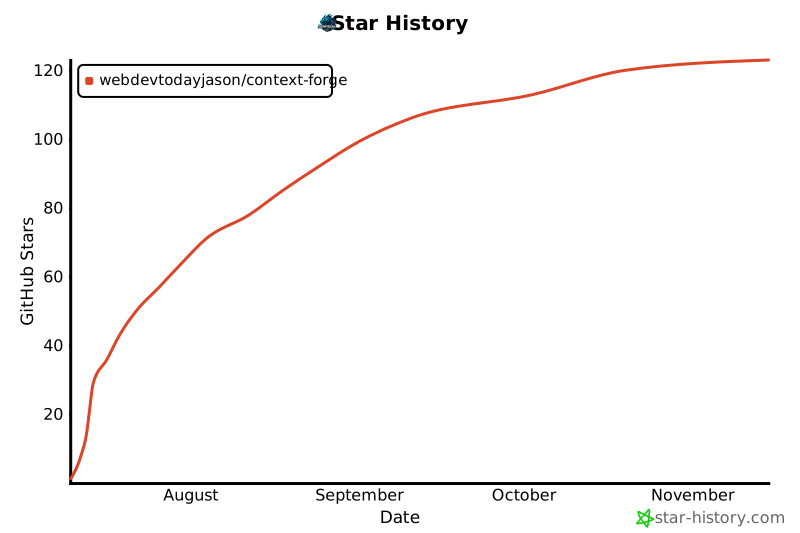](https://star-history.com/#webdevtodayjason/context-forge&Date)